Google Analytics

☀️ Special Edition Tuesday Tech Alerts: Summer Tech Camp 2025 ☀️


August is a great time to sharpen your technology skills to help you be more effective and efficient in the coming year.


Please check out our upcoming GCSD Summer Tech Camp Sessions HERE bit.ly/SummerTechCamp2025. 


Here are a few highlights of what we are offering:


  • Google Workspace Sessions: increase your skills with tips and tricks for beginners and intermediate or polish your Google Sheets skills. Time to finally get yourself out of Microsoft Office!

  • MagicSchool and AI: build your understanding and skills with AI to make teaching and working even more effective!

  • Communication Tools: for classroom communications or making newsletters and videos to get your message out!

  • Classroom Tech Management: leverage classroom technology for enhanced student engagement and reduced distractions as well as Infinite Campus, Google Classroom, and more!

  • New this year are three opportunities to get help with a Tech Coach while you work on your own personalized project


With over 32 hours of PL sessions, these offerings are eligible for GTA Professional Learning Hours and are a great way to get a head start on your 10 required hours for the 2025-26 school year! 


Register in Frontline HERE ASAP as space is limited!


6-3-2025 Tuesday Tech Tips


In today's edition, you can learn all about:

  • A neat Windows tool to take copying and pasting to the next level
  • A reminder about Phishing emails
  • Notes about saving in MyViewBoard
  • The importance of regularly updating your Chromebook
  • and more!
  •  ➡️ ➡️➡️  

💡 Quick Tip 💡


We highly encourage you to please update your Chromebooks regularly- and encourage your students to update, too!  Make that a "classroom job,"- have a class "Chromebook Update Encourager."  Or make it a classroom routine- every Friday morning, everyone updates.  

To update, click on the clock, the gear, then on the bottom left, "About Chrome OS."  Then in the top middle of the screen, "Check for Updates."

  • Updating can solve problems before they happen!
  • Updating regularly is the best way to keep your device running efficiently
  • After an update, the device will prompt the user to restart.  Restarting regularly is also a great way to keep the device running efficiently
  • If you don't manually update, the device will eventually update on its own.  
    • But if you update manually, it usually takes just a minute or two, tops- whereas waiting for the device to update on its own results in longer update times.
    • Regular, small updates are quicker than occasional large updates.   


Do you have a tip or idea for the Tuesday Tech Tips? Or a request for a topic or question you'd like to know more about? Please let us know! You can email us at joseph.lombardo@greececsd.org with your submission.
___________________________


Reminder- Don't Get Phished! About 90% of the Time, Cyberattacks Are Successful Due to Human Error.

Please take a few moments to review the poster above to see how to recognize and avoid phishing emails. These skills don't only apply to your GCSD email- your personal email is likely a target of phishing, too!
___________________________


Did you know you can access the history of what you've copied on a Windows device, and paste it easily any time? Using Windows Key + V is a great way to easily paste text that you regularly use over and over. You can also use this function to paste items other than what you most recently copied. This is includes both text and images.

Check out the video HERE, also embedded below, for an explanation on how to use this handy, time-saving tool for Windows users.


___________________________


Coming Soon....
News on Summer Tech Camp 2025!
___________________________

MyViewBoard auto save only autosaves after you’ve manually saved once.

When autosave is enabled in myViewBoard, it automatically saves your progress every 10 minutes. However, if you haven't manually saved a file yet, the autosave feature does not work. It is essential to manually save your work using the Save as function to designate a specific folder destination on your local drive or cloud storage.

To ensure your work is saved correctly, follow these steps:
    • Open File Manager
    • Press Save as
    • We recommend saving to Google Drive
    • Name the file and press the confirm button to save


Yes, we learned this the hard way.

___________________________


For assistance with these topics, or anything else related to instructional technology, please click HERE to book an appointment with your building's ITT.

'

Tuesday Tech Tips Special Edition: Dangerous TikTok Chromebook Challenge 5-20-2025


GCSD Staff-

The message below was recently sent to families across the district regarding a TikTok Chromebook Challenge. We’ve observed this trend in some Greece classrooms and wanted to make sure everyone is informed with this consistent message. 

According to the article HERE, an individual in RCSD was just hospitalized due to a "smoking" Chromebook.  While it hasn’t been confirmed yet that this was connected to the Chromebook Challenge, at least five of these incidents across New York are reportedly connected. 


Dear Families, 

We need your help addressing a dangerous trend happening in some of our schools. A current TikTok challenge encourages students to insert pencil lead into Chromebook USB ports, which can cause sparks, short circuits, and even fires.

Unfortunately, in many cases, students are damaging other people’s devices—not their own—leaving their peers without a working Chromebook. This is unfair and disruptive, especially since we do not have an unlimited supply of replacement devices. 

Please talk with your child about respecting school property and the impact their actions can have on others. Make them aware that any student found intentionally damaging a Chromebook will face disciplinary action, and families will be responsible for replacement costs—up to $200.

Thank you for your support in keeping our schools safe and focused on learning.

5-13-2025 Tuesday Tech Tips


In today's edition, you can learn all about:

  • Great ways to earn PL hours by June 1
  • A reminder about Phishing emails
  • Some sad news about Loom
  • and more!
  •  ➡️ ➡️➡️  

💡 Quick Tip 💡


Here's a tip we got from TechNotes...

In Docs, Sheets, etc., "Use @ to Insert Smart Chips and Building Blocks. Typing @ in a document lets you quickly insert:
  • People
  • Calendar Events
  • Files
  • Checklists
  • Meeting Notes
  • Decision Logs
  • Road Maps
  • Trackers

And that’s just a handful of what pops up. Just type “@” and skip the menus—everything you need is right at your fingertips!"


Do you have a tip or idea for the Tuesday Tech Tips? Or a request for a topic or question you'd like to know more about? Please let us know! You can email us at joseph.lombardo@greececsd.org with your submission.
___________________________


Reminder- Don't Get Phished! About 90% of the Time, Cyberattacks Are Successful Due to Human Error.

Please take a few moments to review the poster above to see how to recognize and avoid phishing emails. These skills don't only apply to your GCSD email- your personal email is likely a target of phishing, too!
___________________________


We're saying goodbye* to an old favorite of the ITT Team. We just learned that Loom stopped offering their fully-upgraded accounts free to teachers. As there are many other similar products that we already subscribe to, we're no longer recommending Loom as a screen-recording tool.

Instead, the same functionality can be found in Google Vids, the WeVideo extension, Annotate, Canva, and Screencast, which is the built-in Chromebook screen recorder. Look for specific articles about those tools in upcoming Tuesday Tips!

Now, about that "*." If you already have the free, full version of Loom, the vendor tells us "users who are currently on the old free education plan will remain on that plan for now. Please rest assured that if there are any future updates to the plan or its terms, we will be sure to notify all affected users via email in advance."

We're afraid we don't know anything beyond that, but our Spidey Sense is telling us to start brushing up on Vids, WeVideo extension, Annotate, Canva, or Screencast.

We probably all know what "for now" means.

___________________________


Coming Soon....
News on Summer Tech Camp 2025!
___________________________


Are you a GTA member who needs to finish up your required 10 hours of PL by the hard deadline of June 1st? Are you looking for high-quality professional learning related to Instructional Technology?


Be sure to check out the ITT page for Recommended Professional Learning opportunities HERE, where you’ll find webinars, certifications, and especially some new AI learning material…all for PL credit!

___________________________


For assistance with these topics, or anything else related to instructional technology, please click HERE to book an appointment with your building's ITT.

'

4-29-2025 Tuesday Tech Tips


In today's edition, you can learn all about:

  • Some notes on use of GCSD email
  • Our Digital Wellness Challenge for Digital Wellness Day on May 2
  • Access to the Software Center on Windows devices
  • Some great ways to earn PL hours by June 1
  • and more! ➡️ ➡️➡️  

💡 Quick Tip 💡

Sometimes, an emoji says it all! Skip the comments and react with emojis in Google Docs for quick feedback and collaboration.

To add emoji reactions, Select Text > Go to Insert > Emoji Reaction  

(Not just "Emoji."  Look further down the list for "Emoji Reaction.")

If no text is selected, it’ll highlight the word where your cursor is. It’s a fun, fast way to get your point across! 


Thanks to https://blog.tcea.org/
for this tip!


Do you have a tip or idea for the Tuesday Tech Tips? Or a request for a topic or question you'd like to know more about? Please let us know! You can email us at joseph.lombardo@greececsd.org with your submission.
___________________________


This is a friendly reminder for all staff that your district-assigned email account should only be used for work-related purposes. Please don't associate your GCSD email address with, say, your Kohl's account, your Indeed or ZipRecruiter profiles, your personal banking accounts, etc.

Not only will this help you keep your personal and professional online accounts separate, it will help protect GCSD from additional potential spam, malware, and other fraudulent emails that our systems are constantly monitoring for.

Similarly, please always use your work email for work-related communications, such as correspondence with parents, families, and students.

___________________________


Did you know that May 2 is Digital Wellness Day? This is not just a day- it’s a worldwide call to pause and reassess our relationship with technology.
One of the ways we can support our students and community is to focus on how we can be a model for digital wellness. To kick things off, consider taking the 1 Week Digital Wellness Challenge linked HERE!
___________________________

Have you found the benefits from using AI (Artificial Intelligence) to enhance your teaching and work related tasks? Want to guide your students to learn the benefits of using AI? Join the MagicStudent Pilot for grade 3-12 teachers! Learn about the pilot HERE and contact your ITT to get started today!
___________________________


Reminder for staff with Windows devices- you have access to the Software Center! It lists the software applications that are available for you to install on your Windows desktop, laptop, and Interactive Panel.

The Software Center can be found by clicking on the Windows icon in the lower left, and searching for "Software." It's the first option that comes up.

___________________________


Are you a GTA member who needs to finish up your required 10 hours of PL by the hard deadline of June 1st? Are you looking for high-quality professional learning related to Instructional Technology?


Be sure to check out the ITT page for Recommended Professional Learning opportunities HERE, where you’ll find webinars, certifications, and especially some new AI learning material…all for PL credit!

___________________________


For assistance with these topics, or anything else related to instructional technology, please click HERE to book an appointment with your building's ITT.

'

Tuesday Tech Tips 4-8-2025


In today's edition, you can learn all about:

  • An update on Teacher Monitor Station requests
  • The best way to format a subject line
  • News regarding students' access to YouTube
  • Access to several years' worth of quick tech tips from our district DDIT meetings
  • and more! ➡️ ➡️➡️  

💡 Quick Tip 💡

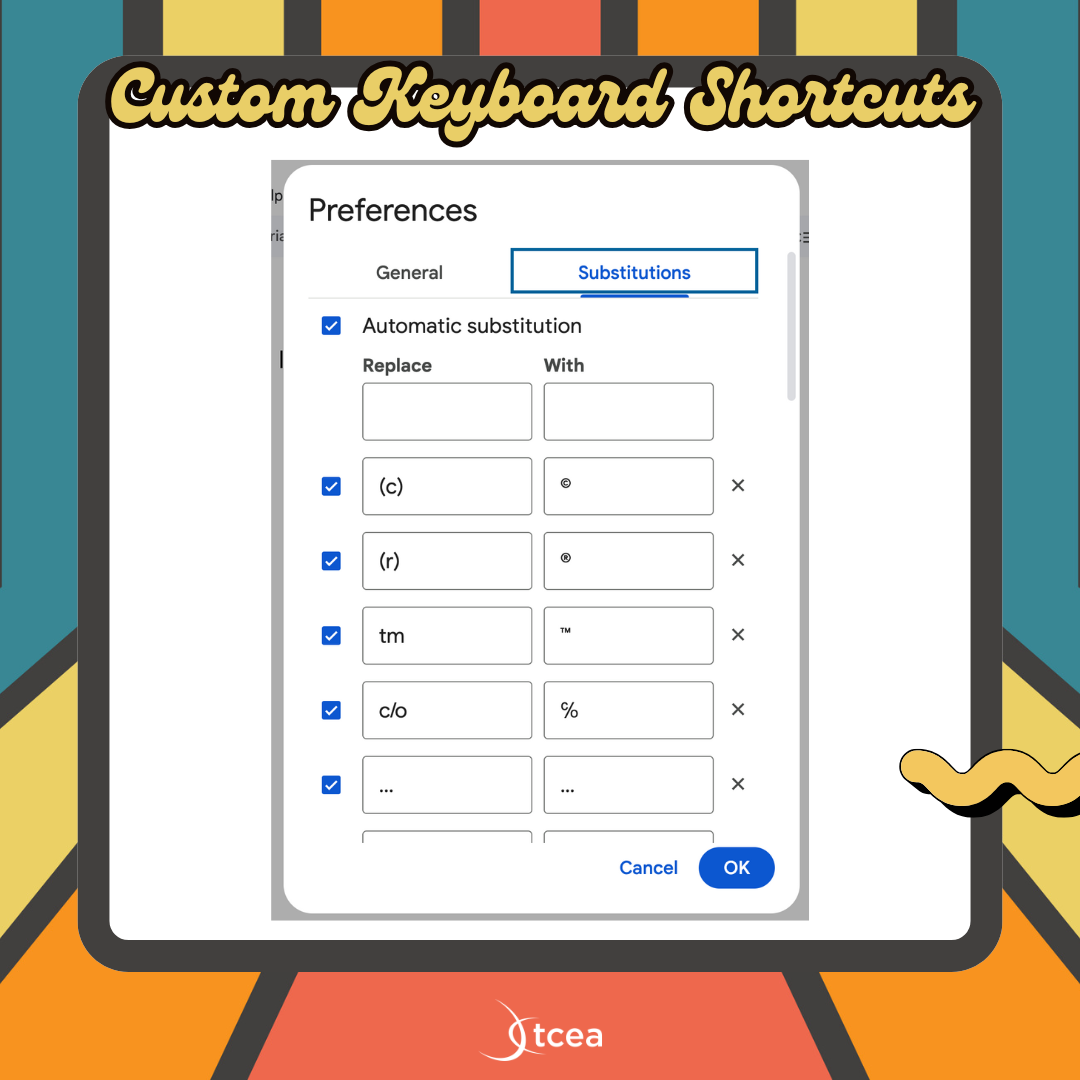
Did you know you can create & customize your own keyboard shortcuts in Google Docs?  For example, you can type "hw," and have it turn into "Homework Assignment."
In Docs, go to Tools --> Preferences --> Substitutions

This is super handy for grading comments, common words, and frequently used phrases.


Do you have a tip or idea for the Tuesday Tech Tips? Or a request for a topic or question you'd like to know more about? Please let us know! You can email us at joseph.lombardo@greececsd.org with your submission.
___________________________


For anyone who has requested a monitor station, as we suggested HERE, please know that they are on order and we will fulfill the helpdesk tickets when they arrive. Thanks for your patience!
___________________________


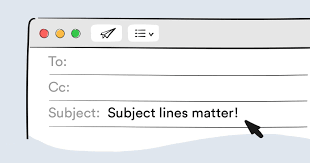
What is the Best Way to Format an Email Subject Line? Keep email subject lines brief- ideally under sixty characters- as this ensures the full message is visible in email previews, especially on mobile devices. Lengthy subject lines can be frustrating for readers as they may not be able to discern the email's content.

Additionally, avoid using the subject line solely as a question without any context in the email body (details HERE). This can be especially confusing for mobile users who may not see the full subject. Instead, provide a concise subject line, and then include the question and relevant details within the email body for clarity. You can view Indeed’s suggestions on how to create a professional email HERE.
___________________________

Have you found the benefits from using AI (Artificial Intelligence) to enhance your teaching and work related tasks? Want to guide your students to learn the benefits of using AI? Join the MagicStudent Pilot for grade 3-12 teachers! Learn about the pilot HERE and contact your ITT to get started today!
___________________________

As we announced in the February 11th Tech Tips HERE, YouTube.com had to be blocked for students as directed by NYS. This is because of NYS’s EdLaw contracts in regards to Student PII. It is not because they think that YouTube is inappropriate.

Perhaps unsurprisingly, some students are finding simple workarounds to watch YouTube. However, these workaround don't include signing into YouTube, so we are not out of compliance with what NYS has asked us to do.

Please understand that TSS cannot possibly block every site that students find that give them the ability to watch YouTube videos.

Please follow any consequences you would apply to a student being noncompliant in your classroom for not following your instructions. It is a violation of the Code of Conduct for student to "access personal, interactive sites unless under the direct supervision of a staff member."
__________________________
“My One Little Thing” is a recurring part that we have during our District Digital Innovation Team (DDIT) meetings. The idea behind them is to show my one little thing we can’t live without with something related to technology.
One of the DDIT members suggested that we share them with the district, so we consolidated them to a Google Slide Deck HERE. It's like a hundred little Tuesday Tech Tips "Quick Tips" all in one spot!
___________________________


Are you looking for high-quality professional learning related to Instructional Technology? Contact your ITT if you’d like to customize PL for your building, team, or department. Also, be sure to check out the ITT page for Recommended Professional Learning opportunities HERE, where you’ll find webinars, certifications, and especially some new AI learning material…all for PL credit!

___________________________


For assistance with these topics, or anything else related to instructional technology, please click HERE to book an appointment with your building's ITT.

'

Tuesday Tech Tips 3-25-25


💡 Quick Tip 💡

This is a quick tip for everyone, and especially all new GCSD employees. But really, everyone. It's crucial that you have a signature in your emails. When sending an email to anyone, especially someone in the district, it's helpful for the recipient to know who you are, what your role is, your location, and possibly an extension to reach you by phone.

Directions on how to create a signature in Gmail can be found HERE.

While not included in those linked directions, we also recommend checking this box when setting up your email signature:


Do you have a tip or idea for the Tuesday Tech Tips? Or a request for a topic or question you'd like to know more about? Please let us know! You can email us at joseph.lombardo@greececsd.org with your submission. ___________________________

Change Your Drive File...But Keep the Link!


Did you know that you can update versions of non-Google files in Drive, such as PDF's and image files, without deleting the old file and adding a new one?  This is a great function to use when you want to update the version of a shared PDF without resharing the new one, and ending up with dead links to the old one.  It's a very quick process, which is shown in the video below, and also linked HERE. 


___________________________


Typing agent feedback

As part of our goal to regularly re-evaluate our digital tools, we're reviewing our K-8 keyboarding program, Typing Agent. If you're a staff member who uses Typing Agent with your students, we'd love to know what you think about it. The good, the bad, or anything in between. Please take a few moments to complete the Google Form HERE. Included in the Form is an opportunity to suggest alternative programs if you're aware of any. Thank you for your feedback- You're just our type!
___________________________


For a "light lift" intro to MagicSchool, we recommend trying out the "Top Four MagicSchool Tools for Elementary Math." You'll find four tools there that can help in your planning and instruction. Check out the image above, also linked HERE, for directions and specifics.

Or for something a little more fun, we love the Image Generator. Details in the image below, which is also linked HERE.

Have you found the benefits from using AI (Artificial Intelligence) to enhance your teaching and work related tasks? Want to guide your students to learn the benefits of using AI? Join the MagicStudent Pilot for grade 3-12 teachers! Learn about the pilot 
HERE and contact your ITT to get started today!
___________________________


For assistance with these topics, or anything else related to instructional technology, please click HERE to book an appointment with your building's ITT.

'